









Businesses often have unique processes for posting sales and purchase invoices and shipments. The most common: some users are responsible for initial postings (like receipts and shipments), while other users take ownership of the invoice posting. But how do you make sure users can’t post invoices by mistake in Microsoft Dynamics 365 Business Central?
Three fields on the user setup help configure what option(s) each user will have when posting various sales, purchase and service transactions.
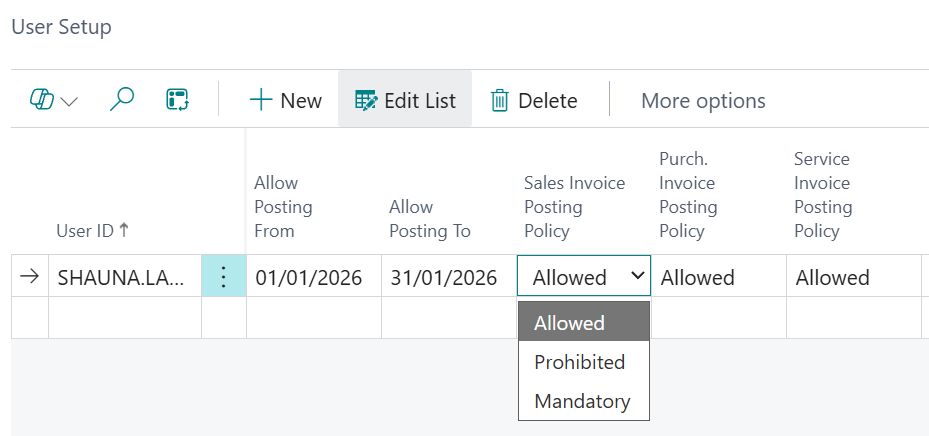
What does this mean for each transaction that the user could be posting? Here’s a summary of the options available to the user per document based on the user setup.
| Document | Allowed | Prohibited | Mandatory |
| Sales Order | Ship; invoice; ship and invoice | Do you want to post the shipment? | Do you want to post the shipment and invoice? |
| Sales Invoice / Sales Credit | No options | Posting is prohibited | Do you want to post the invoice? Or credit? |
| Sales Return Order | Receive; invoice; receive and invoice | Do you want to post the receipt? | Do you want to post the receipt and invoice? |
The Purchase Invoice Posting Policy and Service Invoice Posting Policy are configured in the exact same way.
Warehouse documents aren’t excluded from this configuration – inventory pick, inventory put-away and warehouse shipment also follow the same Posting Policy by user.
This process is different from Posting Restrictions, which is more dependent on the to and from dates defined on the user setup to prevent transactions ending up in the wrong accounting period. Be careful though because while the dates will be correct for accounting purposes this does not prevent the users incorrectly posting invoices as their options are not restricted.
So why not use them in tandem?
Posting Restrictions: ensure users cannot post before or after specified dates.
Posting Policy: ensures users can only post using the method they are allowed (direct or batch).
Together: they stop incorrect postings both by timing AND by permissions.
In summary, Posting Restrictions control when a user can post; Posting Policy controls how they post. Together, they create strong financial control, reduce errors, enforce approvals and protect closed periods.
For Business Central training, or a conversation about moving your Business Central support to Tecman, drop us your details today.